A student certificate verification plugin for WordPress lets a school or training provider publish a certificate-number lookup on its own website. A student shares a number with an employer or admissions office; the visitor checks the matching record online. The right setup depends on one question: do you also need WordPress to create the certificate?
Two ways to verify student certificates
V-1 creates and verifies certificates. Use WordPress Certificate Generator & Verifier (V-1) if your team wants to design a template, import student records and issue downloadable PDF or PNG certificates. It includes a visual designer, 16 templates, unique certificate numbers and optional QR verification.
V-2 verifies certificates you already make. Use Certificate Verification System (V-2) if you already design and export certificates using another tool. Add student records, attach finished certificate files and publish a lookup. V-2 does not generate new PDF certificates.
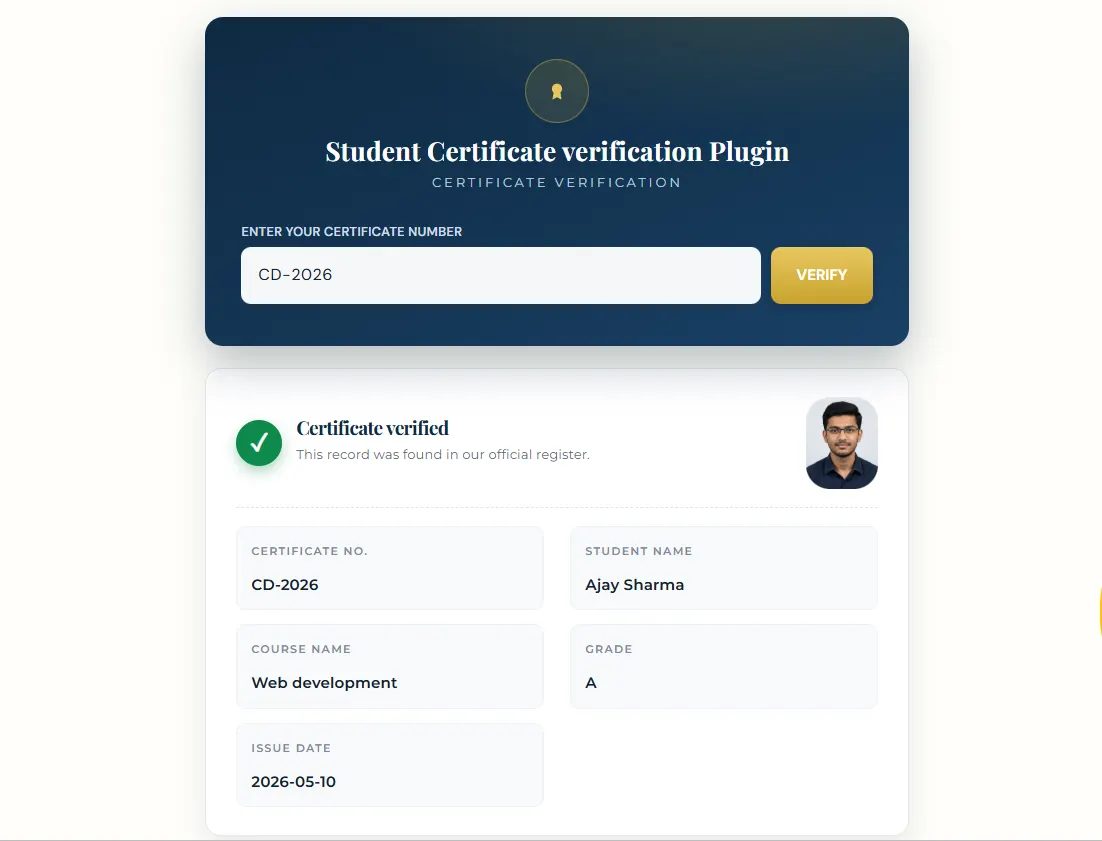
What your verification page should show
Start with a clear field for the unique certificate number. The result should give visitors enough information to match the certificate, such as student name, course and issue date, without exposing unnecessary private student details. Add a clear message when a number does not match a record. Test both results yourself before linking the page in emails or on printed certificates.
Your institution remains responsible for the accuracy of its records. Before importing a class, check duplicate numbers, student names and dates. Both V-1 and V-2 support CSV import, which helps when a training cohort contains many certificates.
Which plugin fits your institution?
- You issue new course-completion certificates: choose V-1. See our certificate of completion guide.
- You only need to confirm existing certificates: choose V-2 and attach the files you already produce.
- You want the setup steps first: read how to implement student verification on WordPress.
Try the workflow before buying
The limited V-1 live demo shows certificate generation and verification. If you are comparing versions, see the V-1 versus V-2 comparison. The live demo is for V-1; there is no V-2 demo linked here.
Common questions
Do I need to redesign existing certificates?
No. If you already create certificates elsewhere, V-2 can attach those finished files to student records. Choose V-1 if you want the WordPress plugin to design and generate the certificate.
Can someone verify a certificate from a phone?
The verification page is web based, so test it on a phone before launch. V-1 also offers optional QR verification on generated certificates.
Ready to add certificate verification to your site? Compare the available WordPress plugins and choose the version that matches your certificate process.